
Definition
podcast clips: Podcast clips are short segments taken from a longer episode. They can be video, audio, audiograms, quote videos, or vertical social cuts for Reels, Shorts, TikTok, or LinkedIn. The source is always the same conversation.
In simple terms: Podcast clips are short segments taken from a longer episode. They can be video, audio, audiograms, quote videos, or vertical social cuts for Reels, Shorts, TikTok, or LinkedIn. The source is always the same conversation.
Quick Answer
Start from the transcript, not a full scrub of the video. Shortlist moments with clear hooks, stand-alone ideas, and timestamps. Review surrounding context before you cut. Publish
Start from the transcript, not a full scrub of the video. Shortlist moments with clear hooks, stand-alone ideas, and timestamps. Review surrounding context before you cut. Publish the clip, then send people to the episode page.
MicNest helps podcasters find the best moments in a conversation — transcripts, timestamps, clip suggestions, and paths back to the episode. Start at https://app.micnest.ai/auth/signup.
Key Takeaways
- ➔ The bottleneck is finding the moment, not exporting a file.
- ➔ A useful clip stands alone, delivers something concrete, and leaves room for curiosity.
- ➔ Transcripts plus timestamps beat scrubbing a 60-minute file by hand.
- ➔ AI can suggest candidates. You still choose what ships.
- ➔ Context matters. Do not cut a line that changes meaning without the next sentence.
- ➔ Link every clip back to the full episode and your website.
- ➔ Your archive is full of clip candidates, not only this week's episode.
An episode can run an hour. Somewhere in it is the moment people would share: a sharp opinion, a useful lesson, a story, a clean answer. Cutting the clip is the easy part. Finding the right moment is the hard part. That is what podcast clips are really about.
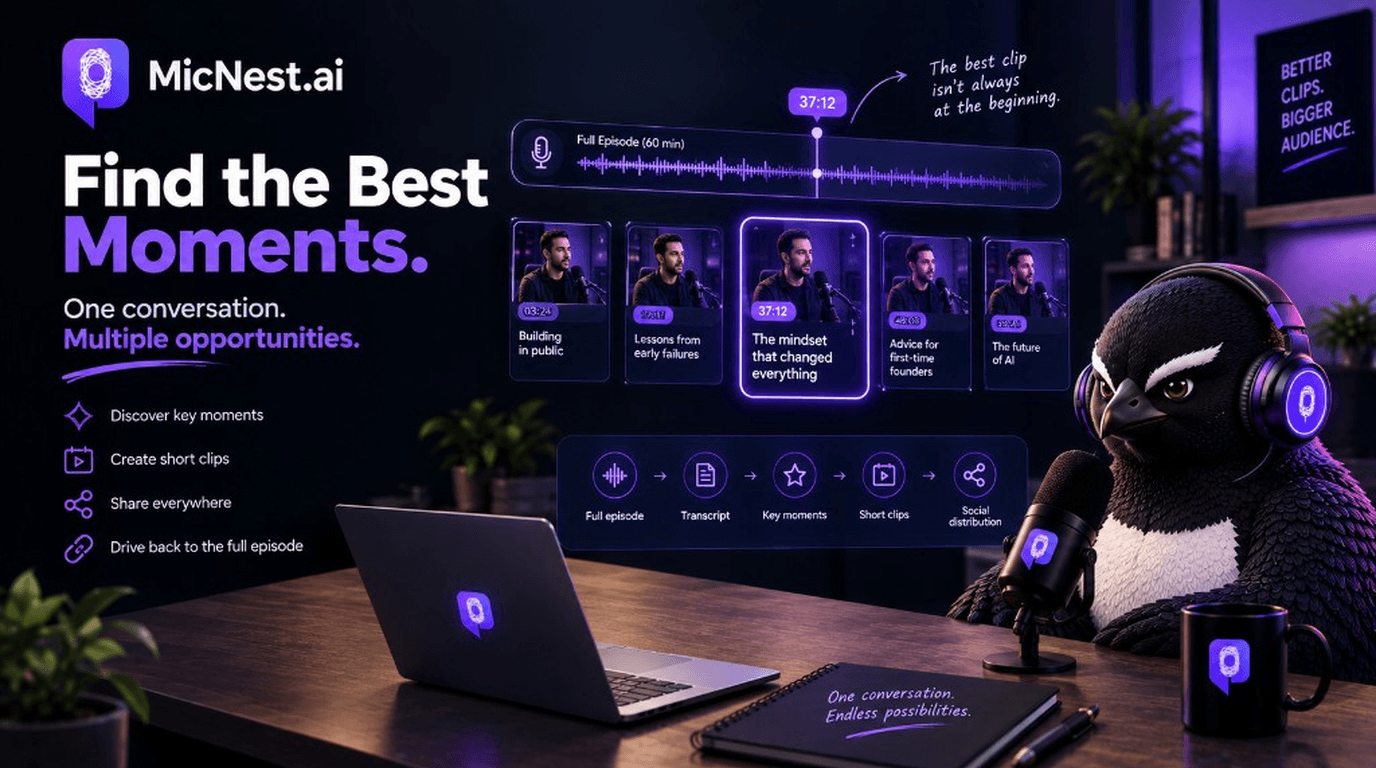
A simple chain: full episode → transcript → key moments → clips → distribution. Same idea as broader content repurposing and content automation.
What Is a Podcast Clip?
A short segment from a longer show. Formats vary by destination:
- TikTok / Reels / Shorts: vertical video
- LinkedIn: a concise idea or lesson cut
- Website: a highlight next to the full episode
Make podcast clips from the conversation you already recorded. Do not invent a second show for social.
Why Clips Matter
Long episodes give depth. Short clips create discovery. Someone may not commit to 75 minutes. They might watch 30 seconds. If the idea lands:
Watch clip → profile → podcast → full episode
Clips do not replace the show. They open a door into it. That is useful podcast marketing when the viewers you attract match who you want listening.
Finding the Moment Is the Real Work
In a one-hour interview you might look for strong quotes, surprising claims, advice, stories, friction, or clear answers. Doing that by hand means watch → note → rewatch → pick → caption → post. It adds up.
AI-assisted discovery helps when it shortlists moments from the transcript instead of making you search in the dark.
What Makes a Good Clip
Not every interesting line is clip-ready.
1. Strong idea up front
Weak: "So, when we started the company…"
Stronger: "We spent six months building a product nobody wanted."
2. Stands alone
Viewer should know what is happening, who is speaking, what the idea is, and why it matters. Captions can help. Twenty minutes of prior context should not be required.
3. Delivers something
A lesson, mistake, framework, fact, or insight. They should leave with a takeaway.
4. Creates curiosity
"What happened next?" or "I had not thought of it that way" is a good signal.
5. Ends cleanly
Do not cut mid-thought so the clip feels unfinished.
Useful Clip Types
- Insight — "The biggest mistake founders make when hiring…"
- Story — "We almost shut the company down…"
- Contrarian — a challenge to a common belief, kept accurate and in context
- Advice — "If I were starting again, I'd do these three things…"
- Question + answer — keeps the interview feel
- Quote — a tight line, with enough surrounding talk when needed
You do not need every type every week. Ship the moments that actually work.
Do Not Optimize Only for Virality
Ask: does this clip attract the *right* people to the podcast?
A clip with 100,000 views is not automatically better than 5,000 relevant ones. Aim for discovery that connects:
Clip → episode → website → more content
Start With the Transcript
Analyze the conversation as text. Look for strong statements, Q&A pairs, repeated themes, surprising claims, advice, stories, and clear explanations. Build a shortlist. Then review.
When text maps to timestamps, the workflow flips:
Identify moment → jump to 28:42 → review → cut
instead of
Open 60-minute file → scrub → hope you find it
That is also how AI podcast search and archive discovery work at a larger scale.
AI Can Suggest. You Decide.
A system can flag candidates by hook strength, stand-alone idea, story, surprise, or topic fit.
Example suggestion: 37:14–38:02 · Hiring · Hook: "We hired too quickly because we thought speed was everything." · Why: clear lesson in a complete beat.
You still listen before publish.
Do Not Clip Out of Context
"You should never hire senior people" may be followed by "before you've established what your team needs." The first line alone misrepresents the guest.
Automated clipping should weigh surrounding talk. Provocation is cheap. Accurate usefulness lasts longer.
Hooks and Captions
Sometimes the strongest line is mid-clip. You can open on that line if the edit stays fair to what was said.
Many people watch without sound. Captions need accurate timing, readable type, clear speaker changes, and mobile-friendly layout. Do not bury faces under walls of text.
One Moment, Several Formats
Podcast moment → 30-second video → quote graphic → LinkedIn post → newsletter insight → carousel
Same source. Different jobs. Example line: "We didn't grow because we needed more content. We grew when we understood what our audience actually wanted." That can become a video cut, a LinkedIn post, a quote image, a newsletter note, or a longer article.
Length is flexible: 15 seconds or 60. Complete idea beats arbitrary duration.
Format for the Platform
Vertical and fast for Instagram, TikTok, Shorts. Clear professional idea for LinkedIn. Shorts plus longer highlights on YouTube. Highlights beside the full episode on your podcast website.
Do not export one file and dump it everywhere without adjusting framing.
Always Link Back
A clip should not be a dead end.
Watch the full conversation → episode page
Listen to the full episode → podcast
Read the transcript → website
Short-form discovery → long-form content.
On the site, people can listen, read, check the guest, browse topics, find related episodes, and join the newsletter. That is how clips feed the wider ecosystem instead of living as orphan posts.
Mine the Archive
With hundreds of episodes, many strong moments are already recorded. Transcript search across the back catalog can surface fundraising advice, AI opinions, or failure stories from older shows. Build a clip library by topic over time so you can reuse when a theme comes back around.
A Practical Workflow
Full episode → transcript → topics → moment detection → clip suggestions → human review → edit → captions → platform formatting → publish → link to episode
Automate where it saves time: transcription, timestamps, topics, candidate moments, caption drafts, title and description drafts, platform copy.
Keep humans on final selection, context checks, accuracy, brand calls, and publish.
How MicNest Fits
MicNest treats the episode as the source. From the conversation it can surface topics, moments, quotes, guest insights, questions, and answers. Those become clip candidates.
Not random clips. The best parts of what you already recorded.
Record → understand → extract → repurpose → distribute
The Real Payoff
The clip is not the prize. The path is.
30-second clip → curiosity → episode → transcript → related episode → guest → newsletter → returning audience
Clips are discovery points into the show you already built.
Closing
Your podcast is full of shareable moments. A 60-minute talk should not require a full manual rewatch to find a 30-second insight.
Transcripts help identify candidates. AI can surface them. Timestamps get you there. Editing turns them into short-form. Your website sends people back to the full conversation.
One conversation → multiple moments → multiple formats → multiple discovery paths
You do not always need to record more. Sometimes you need to unlock more of what you already have.
Frequently Asked Questions
What makes a good podcast clip?
A clear idea, useful insight, memorable story, strong opinion, or complete answer that works without the whole episode for context.
How long should a podcast clip be?
Long enough to finish the idea. Short enough to drop filler. No single magic number.
Can AI find the best moments in a podcast?
It can analyze transcripts and suggest moments. Human review still matters for context and final picks.
Can podcast clips be created automatically?
Parts can: transcription, moment detection, captions, draft metadata. Final edit and approval stay with you.
Should every episode create multiple clips?
No fixed quota. Some episodes yield several strong cuts. Others yield fewer. Quality first.
Where should podcast clips be published?
Wherever your audience already is: Instagram, TikTok, YouTube, LinkedIn, and your own site.
Should clips link back to the full episode?
Yes. Give interested viewers a clear path to the complete conversation.
Turn Your Best Moments Into More
Your podcast already has the raw material.
MicNest helps find ideas, moments, guests, and topics inside it so people have more ways to discover the show.
One conversation. More ways to discover it.
Related Reading
Before vs after
Before
- — Best moments stay buried mid-episode
- — Editors scrub full videos looking for hooks
- — Clips get posted with no path back to the episode
After
- + Transcripts and timestamps shortlist candidate moments
- + Humans review context before cutting
- + Every clip points back to the full conversation
Who is this for?
Podcasters
Creators who want short-form clips without scrubbing every hour of audio by hand.
Social & content teams
Teams turning interviews into Reels, Shorts, LinkedIn clips, and quote posts.
Show producers
Producers reviewing AI clip suggestions, captions, and episode links before publish.
Turn your best moments into more
Podcast clips turn strong moments from a conversation into short-form discovery. MicNest helps surface candidates from transcripts and connect them back to the full episode.
Explore MicNest or start freeSources
- MicNest product — MicNest helps surface clip candidates from transcripts and connect them back to the full episode.
Frequently Asked Questions
What makes a good podcast clip? +
A clear idea, useful insight, memorable story, strong opinion, or complete answer that works without the whole episode for context.
How long should a podcast clip be? +
Long enough to finish the idea. Short enough to drop filler. No single magic number.
Can AI find the best moments in a podcast? +
It can analyze transcripts and suggest moments. Human review still matters for context and final picks.
Can podcast clips be created automatically? +
Parts can: transcription, moment detection, captions, draft metadata. Final edit and approval stay with you.
Should every episode create multiple clips? +
No fixed quota. Some episodes yield several strong cuts. Others yield fewer. Quality first.
Where should podcast clips be published? +
Wherever your audience already is: Instagram, TikTok, YouTube, LinkedIn, and your own site.
Should clips link back to the full episode? +
Yes. Give interested viewers a clear path to the complete conversation.

